Greenfield vs Legacy Projects: Pain is Temporary
Greenfield vs legacy software projects. Learn when to suffer, how to refactor effectively, and why alternating between both makes you a better engineer. Includes AI tools guide.

Motivation
After writing about Greenfield vs Legacy Software: The Hidden Career Benefits of Legacy Code, I kept thinking: okay, but how do you actually make legacy work rewarding instead of soul-crushing? And how do you keep greenfield projects from becoming tomorrow’s nightmare? Let’s dive in.
I’ve got a few thoughts about team morale in the cycle which I visualized in the diagram below. It’s just my opinion—your observations may differ.
The diagram illustrates the emotional journey in both project types. Notice how greenfield excitement peaks early but drops at production, while legacy pain peaks initially but improves as you gain mastery and implement improvements.
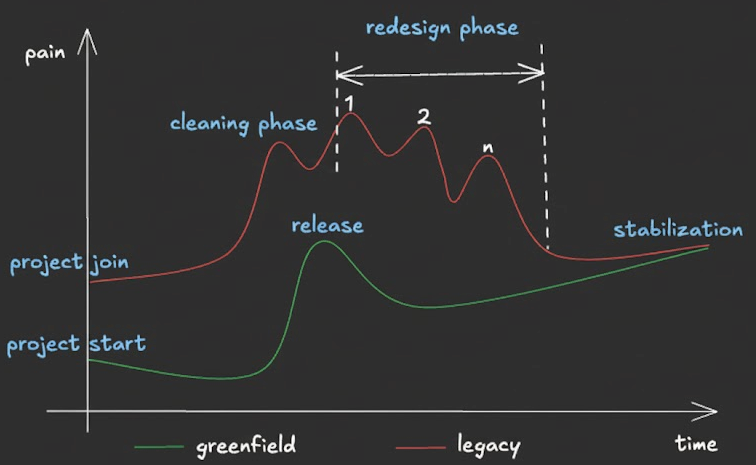
Let’s look at working on the system from a different angle. What if work is not about adding only new features but making things better overall? Happy users make the business happy, a happy business puts less pressure on engineers. Engineers gain trust and space for improvement—freedom and capacity appear. That’s the point where work is not about fixing bugs or adding new features only, but about change.
To recap from part 1:
- Greenfield: Clean slate, modern stack, no production yet
- Legacy: Complex codebase, outdated tech, live users, no clear documentation
Refactoring is the key
When a new greenfield project is starting, the team is excited about new technology, architecture, no legacy codebase and delivering new experience for users. On the other hand there are things to do which are boring like setting up new service, gluing all frameworks, configuring CI/CD pipelines, adding monitoring, logging and alerting. If you are lucky, most of the things are automated by DevOps team or there are some templates which can be used out of the box. After that phase, the team is able to focus on delivering new features till system goes to production. After that moment, things are changing. Users are using the system, reporting bugs, engineers are woken up during night because unexpected things happen or alerting setup needs some tweaks. After a while project is stable but from other hand it is becoming more and more complex. That means work is no longer so exciting as before.
On the opposite side of the spectrum, joining a legacy project is like hitting a wall. Luckily I’ve got some insights how instead of breaking it you can jump over it. How do you jump over that wall instead of breaking against it? The answer lies in two phases: cleaning and redesign. Let’s start with the cleaning phase, which provides quick wins and builds momentum.
Cleaning phase
1. Remove dead code!
- Use your IDE to find unused (gray) code.
- Ask team members about dead code paths, unused features or endpoints.
- Check imported dependencies, are they really needed?
- Use IDE or AI agent to look for unreachable statements.
This is a very important step and relatively easy to execute. It will improve experience with working for all engineers. Other benefits are less obvious:
- There is less code to read and maintain.
- IDE indexing and code navigation are faster.
- The production package is smaller.
- CI/CD pipelines run faster.
- Application startup is faster.
- You may see some memory savings and GC behavior improvements.
- JIT (if you are in JVM world) will have less code to optimize.
2. Improve logging and monitoring!
Before diving into architectural changes, you need visibility into what’s actually happening in your system. Legacy systems often suffer from poor observability - logs that tell you nothing useful, metrics that don’t align with business flows, and alerts that wake you up for false alarms.
Start by auditing your current observability setup:
Structured Logging: Are your logs machine-readable with consistent formats (JSON is ideal), or are they free-form text that requires regex gymnastics to parse? Each log entry should include essential context like request IDs, user IDs, and timestamps. Replace meaningless messages like “Error in process” with meaningful ones like “Failed to process payment for order 12345: insufficient funds”.
Business Metrics: Your monitoring should reflect what actually matters to users and the business. Track key flows like user registration completion rates, payment processing success rates, or API response times for critical endpoints. Don’t just monitor CPU and memory - those are symptoms, not causes. When something breaks, you want to know “checkout is failing for 30% of users” not “pod memory is at 85%”.
Actionable Alerts: Review your alert rules. Can you take immediate action when an alert fires, or does it just create noise? Alerts should be tied to real user impact and include enough context to begin troubleshooting. If your team is ignoring alerts or treating them as background noise, that’s a sign they need refinement.
Distributed Tracing: In modern systems, a single user request often touches dozens of services. Can you follow a request from entry point to database and back? Tools like OpenTelemetry make it possible to trace requests end-to-end, identifying bottlenecks and failures across service boundaries.
Incident Tracking: Are you learning from failures? Track incidents in a structured way - categorize them by type, measure time to resolution, and conduct blameless post-mortems. Patterns will emerge showing which parts of the system need the most attention.
Good observability isn’t just about fixing problems faster - it builds confidence. When you can see what your system is doing, refactoring becomes less scary. You’ll know immediately if a change breaks something, and you’ll have the data to prove improvements are working.
Once you’ve cleaned up the obvious issues and established better observability, you’re ready to tackle deeper architectural problems. The redesign phase requires more effort and patience, but it’s where the real transformation happens.
Redesign phase
This phase is about improving architecture and design of the system. It will take more time and effort but will bring a lot of value. Think about it as refactoring code, but at a higher architectural level. Unfortunately, there is no silver bullet here, it will be many cycles, each will be probably painful, each will require testing and validation, you will feel that there is no light in the tunnel. But trust me, there is one! There are two main design patterns which can help you to improve system architecture: ACL (Anti-Corruption Layer) and Strangler Fig Pattern. Both are well described in literature, but I am leaving links here.
1. Discover and refactor supporting domains
There’s a good chance your system has some supporting domains which are not core to the business but are necessary for operation. Examples include authentication, audit, logging, and notification services. You can start by extracting such domains into separate modules. This brings multiple benefits:
- Reused across the whole application
- Easier to maintain and test
- Smaller, more focused business domains
2. Improve bounded contexts
Here real refactoring work is starting. You need to identify bounded contexts in the system, understand their boundaries, and how they interact with each other. You can use techniques like domain-driven design (DDD) — an approach that structures code around business domains—to help identify and define bounded contexts. After that you can start refactoring the system to better align with bounded contexts. This can involve moving code between modules, creating new modules, and changing the way that modules interact with each other. This process can be complex and time-consuming, but it will bring significant benefits in terms of maintainability and scalability. Again, here you can use above-mentioned design patterns like ACL and Strangler Fig Pattern or Event Storming sessions to help with that. One of the hardest parts will be database schema changes and data migration. You need to plan it carefully, test it thoroughly, and ensure that there is no data loss or corruption.
Stabilization is the goal
Notice something important in the pain diagram above: both the greenfield and legacy curves eventually meet at stabilization. This isn’t just optimistic thinking - it’s what happens when you consistently apply refactoring principles.
The legacy path (red line) shows declining pain as you execute the cleaning and redesign phases we discussed. Each dead code removal, each monitoring improvement, each bounded context you clarify reduces the friction. The pain spikes labeled 1, 2, through n represent individual refactoring cycles - yes, they hurt temporarily, but each one moves you closer to stability.
The greenfield path (green line) shows increasing pain post-release as complexity accumulates and technical debt builds. Without continuous refactoring, what started clean becomes tomorrow’s legacy nightmare.
The takeaway? Both project types require the same discipline. Legacy projects need systematic cleanup to reduce pain. Greenfield projects need proactive refactoring to prevent pain from accumulating. The destination is the same: a stable, well-architected system. The only difference is the starting point.
Conclusion
The choice between greenfield and legacy projects isn’t about which is “better”—it’s about understanding what each path offers for your growth as an engineer and the impact you can make.
Greenfield projects teach you to make architectural decisions from scratch, choose appropriate technologies, and design systems with foresight. You’ll experience the thrill of creation and learn hard lessons when your design meets production reality. You’ll build expertise in modern tooling and practices. However, you’ll miss the invaluable experience of working with constraints, understanding long-term system evolution, and developing the patience required for meaningful refactoring.
Legacy projects force you to become a more complete engineer. You’ll develop debugging skills that greenfield developers rarely need, learn to work creatively within constraints, and understand how systems evolve over years. The satisfaction of transforming a chaotic codebase into something maintainable is unmatched. You’ll also gain rare skills that make you highly valuable—engineers who can successfully navigate and modernize legacy systems are always in demand.
The best career path? Alternate between both. Each greenfield project will make you more thoughtful about long-term consequences. Each legacy project will make you more pragmatic about trade-offs and more appreciative of good design decisions.
With the arrival of AI tools, both paths have become more accessible. AI accelerates documentation, code understanding, and routine refactoring—but it doesn’t replace the judgment and experience you’ll build by working in both environments. There will be more about that in the next blog post.
Whether you’re starting fresh or diving into decades-old code, remember: your goal isn’t perfection—it’s continuous improvement. Every refactoring, every cleaned-up module, every improved test brings value. Small, consistent improvements compound over time into transformational change.
So the next time you face a daunting legacy system, don’t despair. See it as an opportunity to develop skills that will set you apart. And when you start that exciting greenfield project, remember the lessons from legacy codebases and build something that won’t become the nightmare you once inherited.
The code you write today is tomorrow’s legacy. Make it count.
References
Books
Site Reliability Engineering: How Google Runs Production Systems - Google, 2016
Comprehensive guide to production operations, incident management, and monitoring strategies.Working Effectively with Legacy Code - Michael Feathers, 2004
Essential reading for anyone working with existing codebases. Covers refactoring strategies and test creation.Refactoring: Improving the Design of Existing Code - Martin Fowler, 2018
The definitive guide to code refactoring techniques and patterns.
Architectural Patterns
Anti-Corruption Layer Pattern - Microsoft Azure Architecture Center
Pattern for isolating legacy systems and preventing architectural contamination.Strangler Fig Pattern - Microsoft Azure Architecture Center
Incremental migration strategy for replacing legacy systems.C4 Model for Software Architecture - Simon Brown
A practical approach to software architecture diagramming.